Time tracking and rosters for shift work

Roster
The weekly plan shows how each shift is staffed and what is still open. The roster suggests staffing. The team only sees the plan once you release it.
- “Optimise shifts” suggests a staffing and takes rest periods, maximum working hours, youth protection, contracts and qualifications into account. PubOS points out violations. Every change comes with a reason, and only what you approve is applied. Responsibility for compliance stays with the business.
- After each shift, the shift lead notes whether it was short-staffed, right or overstaffed.
- Staff shifts, reuse shift templates and whole weeks as templates, copy weeks.
- Open seats, missing qualifications and outages are marked in the plan, including changes made after the release.
- Events and peak periods feed into planning. “Check absence” shows which shifts a leave request or sick note would affect.
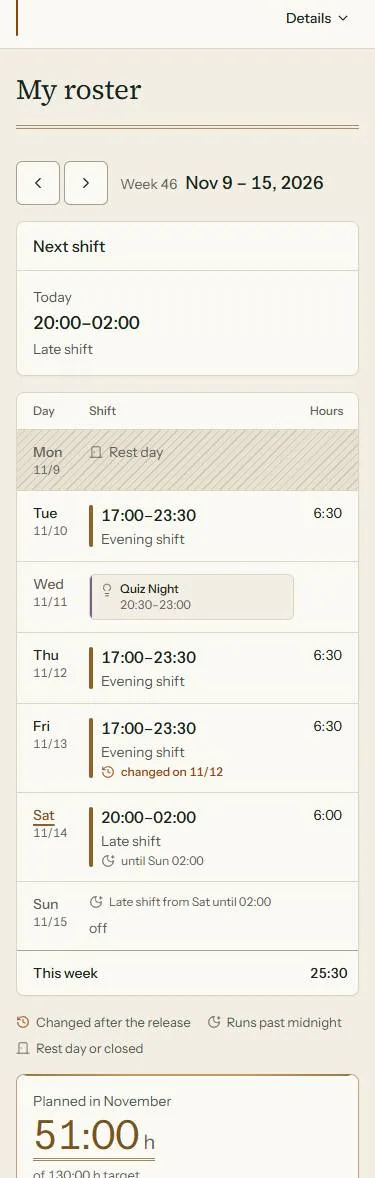
- Employees see their shifts and the team plan on their phone and can subscribe to the roster in their calendar.
Time tracking
Staff clock in on their phone or on a screen at the venue. Managers see target hours, actual hours and the hours account without copying anything from paper.
Digital time clock
Put a tablet up at your venue. It shows a QR code, and staff scan it with their phone to clock in and out. You do not need a separate time clock.
Clocking happens on site: the code on the tablet at the venue protects against clocking in from elsewhere.
- Time clock with clock-in, break and clock-out. Shifts past midnight are booked to the right day.
- For each action you decide whether staff use the button, the scan or either.
- The hours account shows target, worked and balance per period. Breaks can be filled in automatically, missing times are added afterwards.
- Leave, requests and sick notes live in the same system. Periods can be closed, and reports downloaded as CSV, XML or PDF.


Staff management
Master data, contracts, documents and qualifications sit in one personnel file. Time tracking and the roster use the same data.
- Contracts are versions with a start date, so what applied when stays traceable. PubOS warns, for example, about an hourly wage below the minimum wage, too few leave days and youth protection rules.
- Documents such as the employment contract or a health certificate are stored as PDFs with validity and expiry date. You decide what the person can see.
- Qualifications such as bar, kitchen or service are kept per person and feed into roster planning.
- Leaving, archive and rehiring are modelled as a process. Roles and two-factor sign-in are set per person.

Stocktake
For businesses that keep stock, such as restaurants and hotels. From raw ingredient to purchase to recipe, PubOS works out how much stock there should be and shows where goods go missing.
- Raw ingredients with pack size, storage location and purchase prices. The average price is weighted by quantity, deposits do not count as cost.
- Recipes per menu item with cost of goods, contribution margin and margin.
- The stocktake runs in steps: purchases, sales, counting on the phone, balance, closing. Opened containers can be weighed.
- The balance compares expected and counted stock per ingredient and rates the deviation as “within range”, “noticeable” or “something is off”. You set the tolerance yourself. Statistics across several stocktakes, export as PDF or CSV.

For staff on their phone
PubOS runs in the browser and can be added to the home screen, no app store needed. Staff clock in, see their next shift and the team plan, request leave, report sick and read their inbox. The stocktake is counted on the phone as well, in the storeroom, with one hand.
Privacy and hosting
PubOS helps you process personnel data under the GDPR: encrypted, with configurable retention periods and a change log. The legal assessment for your business stays with you. We support you technically and with documentation, but we do not give legal advice.
Encrypted personal data
Names, e-mail addresses, contract data and notes are stored encrypted, field by field. Even a backup or database dump does not show them in plain text.
Retention and deletion
You set how long sessions, login attempts and notifications are kept. After an employee leaves, the account stays readable for a set period and is then deleted automatically.
Audit log
Changes to business data are logged with the person, the time, and the old and new value. Entries cannot be edited in PubOS.
Access
Administrators must sign in with two-factor authentication; it can be switched on for staff. When clocking in by QR code, the camera only reads the code and no image is stored.
Your own infrastructure
When self-hosted, PubOS runs via Docker on your servers. The data stays in your infrastructure.
Hosting options and pricing
You choose who runs the server.
Cloud service
from €50 per monthNote on the price
- We run PubOS for you, you need no server of your own.
- You start without any installation.
Self-hosted
from €50 per monthNote on the price
- Installed via Docker on your own servers, with instructions for updates, backup and restore.
- Your data stays in your infrastructure.
- We discuss licence, set-up and operation with you.
Both options from €50 per month.Note on the price Get in touch and we will tell you your price.
Our offers are aimed at businesses within the meaning of section 14 of the German Civil Code (BGB) and at public bodies, not at consumers.
PubOS for your business
Tell us how many people work for you and whether cloud or your own server is an option. We will reply with a suggested date.